Showing posts with label Manageengine. Show all posts

Friday, April 30, 2021

Product Update MANAGEENGINE - APRIL 2021

[E-book] Understanding and mitigating Exchange zero-day vulnerability exploits
We take a deep dive into how attackers exploited the zero-day vulnerabilities in Microsoft's Exchange servers, mitigating the vulnerabilities in your organization, and performing damage control and threat analysis if your organization has been compromised. Get your e-book copy.

ADAudit Plus rolls out Huawei NAS storage auditing
The latest versions, build 6070 onwards, let you audit file accesses and permission changes across Huawei NAS servers. It also leverages digital code-signing to ensure the integrity of the software. View the complete release notes

5 common AWS configuration errors that lead to cyberattacks
Your cloud deployments are only as safe as their security configurations. Protect your cloud by resolving the most common configuration errors. Find out how.

Log360 UEBA enables you to add notes about users and entities
Starting with Build 4026, you can select any user or entity, and add or update notes about them. Notes will the security team to share their findings with each other and collaborate more effectively. View the complete release notes

[E-book] Tried and tested best practices for Active Directory security
You'll see practical use cases and real life examples to understand where an organization may slip up, and identify eight tried-and-tested Active Directory security best practices. Read now

Azure security 101: Security essentials, logs, authentication, and more
Many businesses have been hesitant to adopt public cloud services and have always kept company data in-house. However, the adoption rate of Azure AD, Microsoft's cloud-based IAM service, is increasing. But just how secure is it?

ADManager Plus to offer notification for automated tasks, and more.
ADManager Plus will soon be equipped with options for notifying users before executing critical automated tasks like disabling inactive user accounts. Additionally it will support automation of file server permission management and automated patch updates for critical vulnerabilities, without the need to update to the latest version. Know more.

Unified Endpoint Management:

We're thrilled to be positioned as a Leader in Two IDC MarketScape Vendor Assessments for UEM 
Desktop Central was positioned as a Major Player in the Worldwide UEM and IoT IDC MarketScape reports. The solution was also recognized as a Leader in the UEM IDC MarketScapes on Apple and SMB Deployments. The report specifically appreciates vulnerability management, patching capabilities and extensive automation of PC life cycle management routines. Competitive bundling and add-on pricing across its product portfolio were also listed as strengths. Download the complete report.

Tune in to our exclusive webinar with Forrester!
Want to grow your organization despite rising security threats? Access our exclusive webinar video on endpoint security to find out how. (Available only for a limited time). Access premium 

EMS Security Suite:

#1. Child Process Control - Application Control Plus now enables its users to control child processes of the applications that they allow. Users can globally configure the child process control policy, where they can select all the applications they trust. Only child processes that are invoked by these selected applications will be allowed to run in all the discovered user devices.
#2. Suspend/Resume Test groups - In all our solutions that support patch management (Desktop Central, Patch Manager Plus, and Vulnerability Manager Plus), users can now choose to suspend and resume the activities of any of the Test groups created under the 'Test and Approve' option.

ManageEngine: ITOM

OpManager: Costa Rican Ministry of Public Education [MEP] Realizes Improved Visibility Into Its IT Infrastructure, Improved Health and Performance
MEP is the technical and administrative body responsible for the accreditation, supervision, auditing, inspection, and control of private schools, from preschool and beyond. Find out how OpManager is useful for their IT needs. Know more

Applications Manager: Gain insight into the performance of Microsoft Teams
Ensure optimal performance of your MS Teams application by gaining in-depth visibility into health status, usage statistics, endpoint connectivity, channels and more. Know more.

APM for Financial Institutions 
Gain end-to-end visibility into critical banking and financial applications as well as the underlying infrastructure. Ensure a seamless digital experience for end users across the globe. Know more.

OpUtils: Comprehensive DHCP server management with OpUtils
Simplify DHCP server monitoring with OpUtils now extended support to monitor DHCP server, its scope, and subnets of Cisco, Palo Alto and Linux ISC DHCP servers. Know more 

Free Trainings:
#1. APM: Step up your server & application performance monitoring game!
May 4, 11, 18, & 25, 2021 6am GMT and 11am EDT Register Now

#2. NFA: Simplify bandwidth management with NetFlow Analyzer
May 6 & 13, 2021 6am GMT and 11am EDT Register Now

#3. NCM: Configuration confusions? Manage your configurations better!
March 16th & 23rd, 2021 6am GMT and 11am EDT Register Now

#4. FWA: Hackers are ready to hack your remote employees!
May 20th & 27th, 2021 6am GMT and 11am EDT Register Now

[Analytics Plus e-book] 10 secret strategies to supercharge IT reporting
We've published a new e-book that discuss proven strategies, tips, and hints that can help users gain powerful insights from their IT data, and put their reporting on turbo drive. Download the e-book now

PAM : Seal gaps in mobile device certificate management
Key Manager Plus integrates with ManageEngine MDM to automate the life cycle management of SSL/TLS certificates deployed to mobile devices. Learn more

Site24x7: Cloud-based remote monitoring platform for MSPs
Differentiate your MSP practice. Leverage Site24x7’s full-stack monitoring capabilities to gain comprehensive insights across the IT environments of your SMBs and enterprise customers. Manage your customers' IT infrastructure with our scalable, secure, and affordable monitoring suite designed for managed service providers and cloud service providers.

Tuesday, January 27, 2015

Gunakan OpManager free untuk monitoring jaringan Anda

Enterprise software vendors often offer free versions of their tools, typically geared toward smaller organizations with limited budgets. ManageEngine OpManager is a monitoring tool that's available in free and paid versions. OpManager Free Edition, which can be licensed to manage up to 10 devices, provides useful information about servers and other monitoring devices. Here's a look at how it works:
After downloading OpManager Free Edition online and installing it on your machine, inform the Setup wizard that you want the Free Edition. Otherwise, it defaults to a 30-day trial version. Next, choose the devices you want to monitor. To do this, enter an IP address (or an IP address range) and a set of credentials.
OpManager uses authentication credentials -- ones not requiring agents -- to connect to monitored devices. The software supports the use of SNMP (versions 1, 2, and 3), Windows/WMI, Telnet/SSH, and VMware. Figure 1 shows a breakdown of CPU and memory use across monitored devices.
OpManager provides resource utilization data
Figure 1. OpManager provides resource utilization data.
One useful thing about the monitoring data OpManager provides is that ManageEngine provides the tools needed to make the data available from outside the OpManager console. In Figure 2, OpManager provides a block of HTML code that corresponds to the top 10 CPU utilization data. You can embed this code into a SharePoint site or any other website to access monitoring data outside of the OpManager console.

Pro+

Features

Enjoy the benefits of Pro+ membership, learn more and join.
OpManager provides you with code to display monitoring data on a website of your choosing
Figure 2. OpManager provides you with code to display monitoring data on a website of your choosing.
In addition to statistics, OpManager also has a robust workflow engine. Admins can manually run workflows, or they can set them to respond to an alarm or run on a specific schedule. For example, a workflow might launch when a process stops or has violated a threshold requirement. Figure 3 shows some of the available triggers.
Workflows can be executed in response to a number of different conditions
Figure 3. Workflows can be executed in response to a number of different conditions.
Workflows are easy to build and are flexible. OpManager uses a Visio-style interface that lets an administrator drag and drop various actions and conditions to a workspace. Actions are divided into categories. For example, there are actions related to devices, Windows services, processes, HTTP and FTP, files, folders, VMware, and OpManager. Figure 4 shows the workflow construction process.
OpManager also has a decent reporting engine
Figure 4. OpManager also has a decent reporting engine.
Many of the built-in reports display the same types of information you can view through various dashboards, but the software allows you build your own reports.  The reporting engine is shown in Figure 5.
OpManager has a built-in reporting engine
Figure 5. OpManager has a built-in reporting engine.
This was first published in January 2015

Friday, January 16, 2015

Desktop Central Voted a “Rising Star” by MobileVillage.com Readers

Desktop Central Voted a “Rising Star” by MobileVillage.com Readers

What better way for Desktop Central to start the new year than with a 2014 Mobile Star Award? How about starting the year with two Mobile Star Awards?!
That’s right, we’re kicking off 2015 with two “Rising Star” awards – one for Mobile Device Management andone for Mobile Asset Management. The honor is amplified by the way the Mobile Star Awards program works: winners are chosen by the mobile-savvy readers of MobileVillage.com rather than a small pool of judges or panelists.
2014_MobileStarAwards_RisingStar (1)As Mobile Star Awards director Gary Thayer says, “[T]he Mobile Star Awards is still the only competition where today’s most exciting new mobile products and companies can compete against established competitors on a more level playing field. A major part of this is because votes are cast by real users who really love the products—these are the mobile early adopters, mobile IT professionals, and tech bloggers who dominate our readership.” 
In addition to our recent awards, we’ve recently enhanced the mobile device management features of Desktop Central to include:
  • Support for Windows Phones
  • iOS VPP license management
  • Multi-language support
 We will continue with the same spirit and make the product even better. Thank you all!

2014 Security Year in Review

2014 Security Year in Review

Whew! Thank goodness 2014 is over! Well, at least if you are considering the year’s security issues, attacks, leaks, and password issues. As a security and Windows Active Directory professional, I feel like I have earned the right and it is the appropriate time to say, “I told you so.”
Let me put this into perspective, to prove my point:
  • 2014 financial services firms – $20.8 million lost to breaches
  • 2014 tech companies – $14.5 million lost to breaches
  • 2014 communication providers – $12.7 million lost to breaches
  • Ebay – 150 million user accounts compromised due to phishing attacks, users asked to change password immediately
  • Home Depot – 56 million credit cards compromised
  • US Post Office – 800,000 employees’ confidential data breached
Unfortunately, there are many, many more that could be listed. Looking at these numbers hopefully makes you wonder how much we are really putting effort into security of our corporate networks. We might be spending money, time, and resources trying to secure our environments at a very technical level, but it seems to be failing.
What I have found is that some of the most basic security controls and configurations are not being done properly, so it is no surprise to me that all of these attacks are succeeding. As we move into 2015, I am going to give you some basic security concepts to consider with regard to your Active Directory environment. These concepts are basic and easy to address.
  1. Allow your help desk to do more productive work and solve deeper issues by implementing a self-service password solution into Active Directory. This will also remove the help desk from the password reset process, which will eliminate one more person from knowing other users’ passwords.
  2. Ensure the core of Active Directory access is secured. ​​I find that over 50% (a recent survey  I conducted indicated this) of administrators find delegations in Active Directory that they did not know existed.Removing Active Directory delegation in lieu of a tool that provides the delegation via a “proxy” is a much more secure.
  3. Start to track, in real-time, the changes that occur to key security controls in Active Directory. I find that most organizations don’t track when groups like Domain Admins, Enterprise Admins, and Administrators change membership. In the end, issues arise or the audit finds the misconfiguration. Instead, have an email show up in your inbox every time a key security control changes, so you can take immediate action.
  4. Ensure your domain users password policy is correct. This is a simple, easy, and necessary task. Knowing that your users’ passwords meet desired criteria is key to ensuring that all users are using some level of secure password controls. Investigating and verifying password policies can help you ensure that network resources are protected.
ManageEngine provides solutions around all of these concepts. We even provide a fully functional trial, so you can see firsthand how our tools can help solve these issues. Just visithttp://www.manageengine.com/windows-active-directory-tools.html to download the tools to tackle these issue in your Active Directory environment.
No one knows what 2015 has in store; however, taking action to help you secure your environment willpotentially keep your company out of the news headlines. Security is performed in layers. You need to ensure your Active Directory environment is correctly layered with many security features and options.

User Creation Templates on Steroids

User Creation Templates on Steroids!

I will be honest. When I tell most people about what I do, Active Directory evangelism, they yawn at me and lose interest quickly. However, I love what I do and find it very enjoyable.
When I say “user creation templates,” does that make you jump for joy? No?
These words used to bore me, but now, they make me jump for joy! Here’s why:
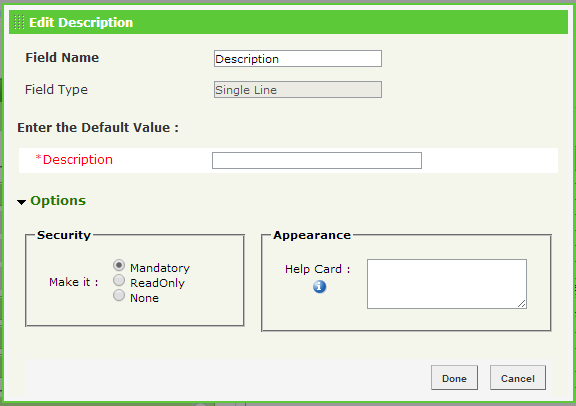
In ADManager Plus, you have new features that are built around the Drag-n-Drop feature. One of the features makes a user property “mandatory” during user creation phase. This means that the property that you have in the template – Description, for example – must be filled out during the creation of the user, or the system will not allow the user to be created.
Figure 1 illustrates how easy it is to make a user property mandatory.
steroids1
Figure 1. Making a user property mandatory in the user creation template.
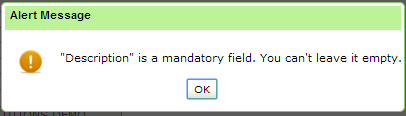
Figure 2 shows you what the error message looks like if you fail to fill out the property when creating a user.
steroids2
Figure 2. Error message indicating a mandatory user property has not been filled out.
Tell me that is not awesome! Now, when I say, “user creation template with mandatory properties,” does that make you jump for joy? YES!

Saturday, January 25, 2014

Monitoring dengan OpManager


A single pane of glass for complete network monitoring

Network Performance Monitoring

Server Performance Monitoring

Monitor other infrastructure devices like Load Balancers, Temperature Sensors, IP Cameras, Printers & more. supports custom SNMP & WMI monitors.

Be the first to know before it affects your end user

Troubleshoot and resolve network issues instantly

Live Network Maps

  • A live graphical representation of your complete network diagram tools that helps you quickly spot network performance bottlenecks.

Powerful network reports

Enterprise ready network management

Extend the power of OpManager

Deploy to production in minutes

Map Security needs to DevSecOps tools in SDLC.

  Map Security needs to DevSecOps tools in SDLC. Implementing DevSecOps effectively into the SDLC involves adopting the right tools, adaptin...