Showing posts with label site24x7. Show all posts

Monday, April 6, 2020

Site24x7

Dengan Site24x7 pastikan Perangkat, Website, Dan Aplikasi anda berjalan

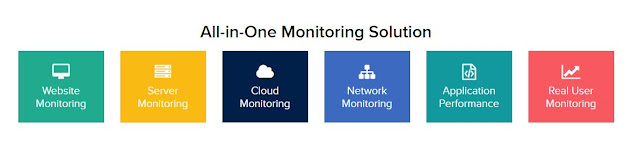
Dengan menggunakan Site24x7 anda tidak hanya dapat memonitoring uptime website anda saja, tetapi juga banyak hal lainnya seperti:

  • Memonitoring performance website Anda; HTTPS, DNS Server, FTP Server, SSL/TLS Certificate, SMTP Server, POP Server, URLs, REST APIs, SOAP Web Service dan masih banyak lagi.
  • Memonitoring aplikasi website menggunakan real browser, seperti Chrome dan Firefox
  • Memonitoring server Windows, Linux, FreeBSD, VMware dan Docker
  • Menerima laporan instan (instan downtime alerts) langsung ke email dan SMS
  • Menganalisis penggunaan CPU, memory, dan storage
  • Mendownload laporan untuk dibagikan kepada klien/pengujung website Anda
  • Menyediakan mobile access sehingga Anda dapat memonitor website atau aplikasi dimanapun Anda berada
  • Dan masih banyak lagi

Capture
Berikut adalalah tampilan dari Site24x7

Capture2

Silahkan kontak kami untuk kebutuhan Perangkat, Website, dan Aplikasi anda

whatsapp-button


Tuesday, May 27, 2014

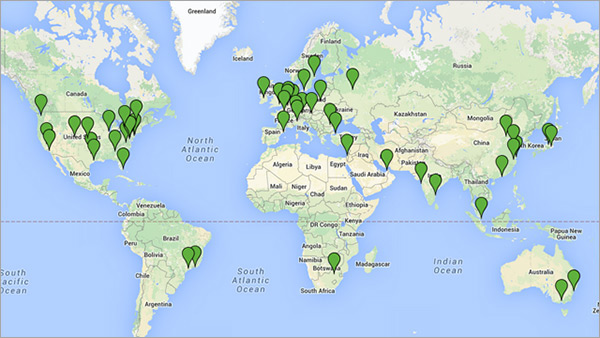
Site24x7 memonitor website Anda dari IP-IP ini.

Site24x7 memonitor website Anda dari IP-IP ini.

Monitor your web site uptime and response time from multiple geographical locations
We have established a global monitoring network by partnering with leading hosting providers. Our network currently includes servers in 50+ different geographical locations. We will be adding more monitoring locations as we go along.
Below is a continent-wise listing of our monitoring locations along with their IP addresses.
Monitoring Locations
IP Address
North America
California, US72.5.230.111
165.254.168.111
72.5.230.65
72.5.230.84
74.201.155.108 
129.250.194.26
New Jersey, US74.201.155.108 
129.250.194.26
Atlanta, US173.234.85.91
173.234.85.92
Chicago, US184.106.199.87
Seattle, US173.234.81.165 
173.234.81.166
Dallas, US173.234.72.183
173.234.72.184
Houston, US198.20.253.19
Virginia, US184.73.189.166
New York, US173.234.70.166
173.234.70.167
Los Angeles, US67.203.15.28
67.203.15.29
Denver, US192.30.132.157
Miami, USNew in Site24x7199.201.88.82
Kansas, US207.126.48.53
Washington DC, US173.193.201.67
Pheonix, US184.95.56.8
Montreal, Canada199.19.214.79 
Toronto, Canada208.69.56.237
Europe
London, UK213.229.90.97
213.175.192.100
213.175.192.101
213.175.210.4
213.175.210.5
80.76.218.60
Cologne, Germany178.77.78.91
Munich, Germany176.9.204.27
Zurich, Switzerland37.235.50.96
Moscow, Russian213.183.56.92
Vienna, Austria37.235.56.210
Warsaw, Poland37.235.48.47
Bucharest, Romania31.215.205.205
Rotterdam, Netherlands134.19.176.30
134.19.176.31
134.19.176.80
134.19.176.81
134.19.176.82
Copenhagen, Denmark77.66.111.162
Brussels, Belgium87.238.165.164
Ireland79.125.119.192
Paris, France87.98.215.169
Barcelona, Spain182.54.235.47
Stockholm, Sweden79.99.1.106
Milano, Italy95.141.35.131
Istanbul, Turkey46.235.8.142
46.235.8.143
Tel Aviv, Israel91.228.126.149
Australia
Melbourne125.214.65.59
Sydney101.0.67.53
202.130.47.243
New Zealand
Auckland120.138.27.125
Asia
Shanghai, China103.6.221.56
Beijing, ChinaNew in Site24x71.93.1.243
Qingdao City,ChinaNew in Site24x7115.28.13.215
Hangzhou City, ChinaNew in Site24x7121.199.6.163
Nagano, Japan 
Tokyo, Japan
203.83.246.45 
54.248.99.81
Chennai, India27.251.30.94 
121.244.182.117
Mumbai, India180.149.241.212
Hongkong180.235.134.190
Singapore City, Singapore175.41.141.147
Middle East
Dubai86.96.192.21
South America
Rio De Janeiro, Brazil201.20.20.237
Sao Paulo, Brazil177.71.177.249
Africa
Johannesburg, South Africa154.0.161.12
You can download the above details as Spreedsheet | PDF | RSS | JSON | CSV | TSV

Site24x7 untuk monitoring internal server


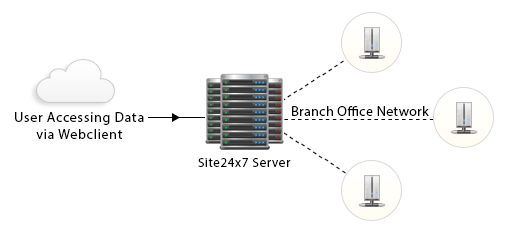
On-Premise Poller Architecture


Site24x7's On-Premise Poller
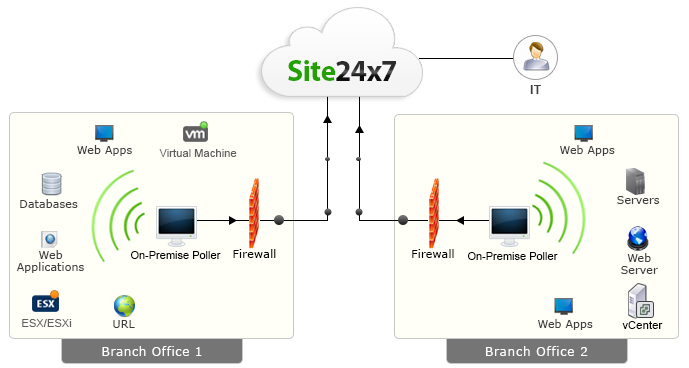
Today's workforce uses both internet and intranet applications to get work done. The Site24x7 On-Premise Poller complements Site24x7'sglobal monitoring network of servers by allowing you to install a lightweight, stateless, auto-updating software component in your internal network or private clouds and monitor your mission critical resources along with internet facing websites.

What can it do?
Site24x7 On-Premise Poller can help you monitor ping network devices, servers, application servers, database servers, intranet portals, ERP systems, payroll applications and ensure other custom applications are up and performing optimally. In short, it can help you monitor resources behind the firewall. 

This is possible by support for network protocols and services like HTTPS, SMTP, POP, IMAP, DNS, Port and Ping. Additionally, its flexible architecture can also help you monitor the end user experience of your web applications as experienced by employees at your branch office. This capability is complementary to the agent based server monitoring and public cloud monitoring capabilities of Site24x7.

How does it work?
The On-Premise Poller is a lightweight, stateless, auto-updating software component that you download and install in your internal network.

This software then helps you monitor internal resources and pushes performance and uptime information to Site24x7 using a cloud friendly architecture (one way HTTPS). No holes in the firewall! 

It can also be installed in various branch offices and used to monitor user experience from that location. Since the installed software report to the central Site24x7 servers, you can view consolidated dashboards and reports.

Why should I try it?
  • Monitor your public and private clouds with Site24x7
  • Add your own monitoring location in addition to the 50+ monitoring locations already supported by Site24x7
  • Be notified instantly about performance or downtime issues via SMS, Email, Push Notifications, Twitter and RSS Feeds
  • Easy to setup and maintain
  • Cloud friendly architecture ensures security of internal resources
  • Enhance productivity of your Operations and IT teams using a simple to deploy software option
  • Free service to ensure your on-premise monitoring products are working effectively

How do I get started?
  1. Sign up for a Site24x7 Enterprise Account.
  2. Download and add an On-Premise Poller by following instructions in the service web client.
  3. Add Monitors. That's it. You are ready to go.

Monitoring server dari cloud via Site24x7

Monitor your Servers from the Cloud
Site24x7 Server Monitoring is a SaaS based monitoring service that helps you to easily capture
and analyze critical metrics such as CPU usage, memory, disk, processes, services and network
utilization for Windows and Linux machines and stay alerted in case of downtime
instantaneously.

Site24x7 Server Monitoring is an agent based monitoring from the cloud for your DNS,
mail servers, websites, web applications, TCP/IP Ports and Ping along with the ability
to monitor resources inside your private network using On-Premise Monitoring.
These capabilities help monitor all the aspects of a server typically used as
web infrastructure.
  • Gain insight into server status and performance
  • Understand usage patterns and plan resource requirements in advance with the extensive reporting feature
  • View critical information in easy to understand charts, all in a single dashboard
  • Get in-depth analysis on the availability and performance of Microsoft Exchange Server
  • Free service to ensure your on-premise monitoring products are working effectively


CPU Usage Monitoring
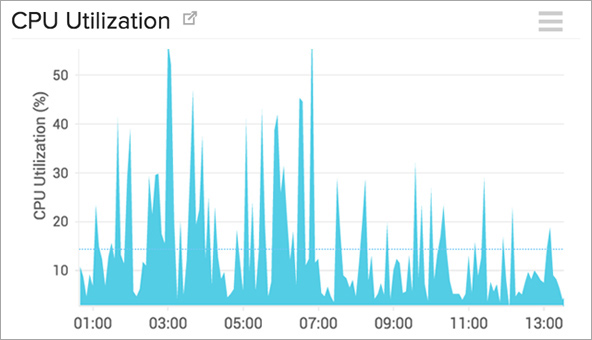
Monitor key metrics such as CPU utilization by processor, core based utilization,
interrupts & context switches easily with Site24x7 for effective CPU usage monitoring.

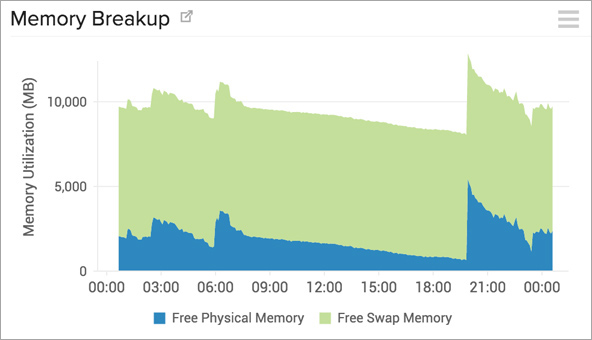
Memory Usage Monitoring
Site24x7 highlights critical memory usage metrics along with
insights on Used Memory &  Free Memory, Memory pages (In/out/fault) 
in different graphs for easy understanding to assist in capacity planning.

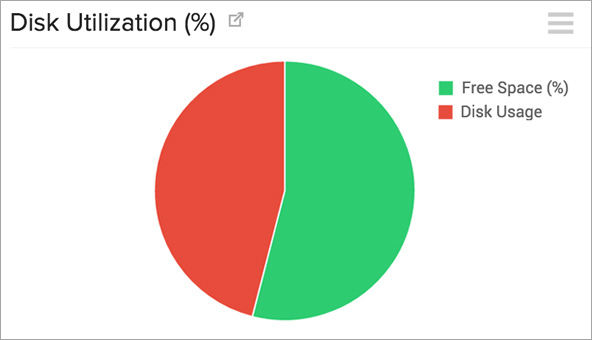
Disk Usage Monitoring
Site24x7 captures key Disk usage metrics like disk utilization,
individual disk utilization, disk (I/O) and represents the information
in easy to view charts that assist you in defining the optimum
disk capacity for non-stop usage.


Network I/O Monitoring
Keep a close eye on traffic utilization to help you determine exactly how loaded your network really is.


Windows Services
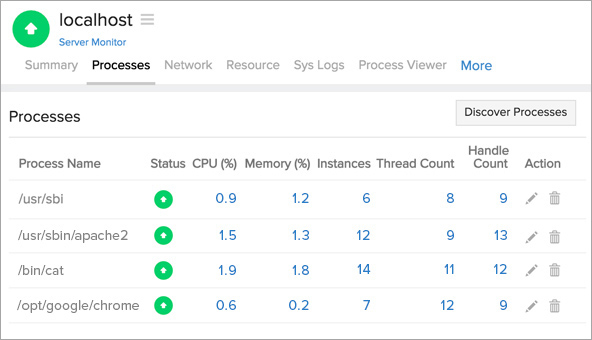
Processes and Services Monitoring
Processes and windows services can be instantaneously
discovered in real-time and can be individually monitored,
so you no longer have to stay in the dark in understanding
which process had caused a server spike. Start / stop windows
services from a single console and view all the information
in an integrated dashboard.


How does it work?
  • Download and install the agent in the server that needs to be monitored
  • The agent will collect the server metrics such as CPU usage, memory usage and disk usage every 5 minutes using WMI
  • The data is then pushed and stored in the Site24x7 server
  • Configure Thresholds and choose to be alerted if any of the resources/usage statistics cross the set thresholds
Flow diagram- server performance monitoring

Map Security needs to DevSecOps tools in SDLC.

  Map Security needs to DevSecOps tools in SDLC. Implementing DevSecOps effectively into the SDLC involves adopting the right tools, adaptin...